 WeddingFlow PH
Planning a wedding comes with a hundred small decisions, and one of the first is how you’ll invite people at all. If you’ve been searching “digital wedding card,” you’ve probably noticed the term gets used a little differently everywhere you look.
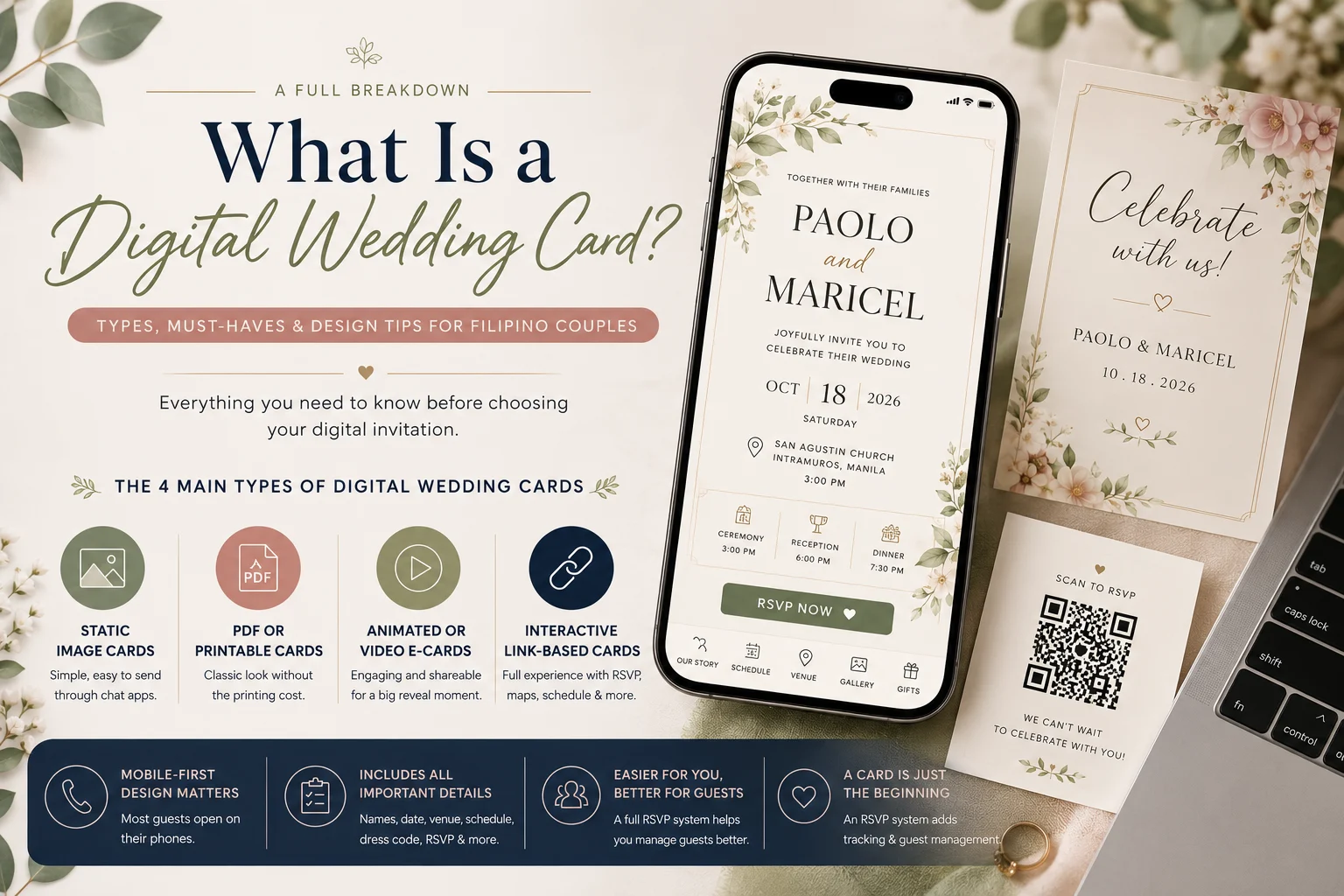
So let’s clear that up. A digital wedding card is simply a wedding invitation designed and delivered electronically instead of printed on paper. It can be as basic as a single image you send on Messenger, or as full-featured as a website with maps, RSVP forms, and a photo gallery.
In this guide, we’ll break down the different types of digital cards, what a well-built one should always include, and the design details that matter more for Filipino guests specifically. By the end, you’ll know exactly what you’re building before you pick a design or a platform.
Highlights
- A digital wedding card is any wedding invitation made and sent electronically instead of printed and mailed.
- There are four main formats: static images, PDFs, animated videos, and interactive links.
- A good card always includes names, date, venue, schedule, dress code, RSVP details, and gift guidance.
- Filipino guests tend to open cards on their phones first, so mobile-friendly design matters more than looks alone.
- A card is just the design—a full wedding RSVP system adds tracking and guest management on top of it.
The 4 Main Types of Digital Wedding Cards
Not all digital wedding cards work the same way. Before you design one, it helps to know what your options actually are.
Static Image Cards (JPG/PNG)
This is the simplest format: a single flat image, usually made in a design tool or by a graphic designer. It’s quick to make and easy to send straight through Viber or Messenger.
The tradeoff is that it can’t do much on its own. There’s no built-in RSVP button, no clickable map, and guests can easily screenshot it and forward it out of context.
- Best for: Casual guests you’re reaching through chat apps.
- Limitation: No interactivity or response tracking.
PDF or “Printable-Style” Cards
A PDF card mimics the look of a traditional printed invitation, but you send it as a file instead of mailing it. It’s a nice middle ground for couples who still want that classic, formal feel.
The catch is that PDFs use a fixed layout built for paper, not phone screens. That can mean extra pinching and zooming for guests trying to read it on a small display, and there’s still no interactive element built in.
- Best for: Couples who want a “keepsake” look without the printing cost.
- Limitation: Not built for small screens.
Animated or Video E-Cards
These use motion graphics or short video clips to make the invitation feel more personal and shareable. Video content generally pulls more attention in a busy chat thread or social feed than a still image does, which is part of why couples like this format for a “big reveal” moment.
The downside is file size. Video files are naturally heavier, which can be a real problem for guests with limited mobile data.
- Best for: Couples wanting an emotional, shareable moment.
- Limitation: Larger file size, harder to fit all the details in cleanly.
Interactive Link-Based Cards
This format sends guests a single link that opens to a full page, combining your card’s design with RSVP forms, your schedule, a map, and even a photo gallery. Of the four formats, it’s the only one that handles all of that natively instead of requiring a separate app or file.
Platforms like WeddingFlow PH are built around exactly this format, since it gives you one shareable link that works everywhere instead of juggling files.
- Best for: Couples managing a larger guest list who need real tracking, not just a pretty design.
- Limitation: Requires a platform or website builder to set up.
The Anatomy of a Well-Built Digital Wedding Card
Whichever format you choose, the actual content on your card matters just as much as how it looks. Here’s what a complete digital wedding invitation should always cover:
- Your full names and the wedding date. Spell out both names clearly, and skip vague shorthand like “and guest.” Write the date in a way that’s easy to read at a glance, especially for older relatives who may not be used to digital invites.
- The host line. This states who’s hosting the wedding: your parents, both families together, or you and your partner. The host line has always been about naming who’s extending the invitation, not about hierarchy, and in Filipino weddings it’s common for both families to be named together.
- Ceremony and reception details, with map links. This is actually where a digital card genuinely beats a printed one: you can drop in a tappable Google Maps link so guests can navigate straight to the venue. A printed card simply can’t do that.
- Your event schedule. Many Filipino weddings have more than one segment: a church ceremony, a reception program, and sometimes a separate civil signing, since Philippine law requires a marriage license and civil registration no matter what kind of ceremony you hold. List each part clearly so no one shows up at the wrong time.
- Dress code. Be specific here. “Barong or long gown” and a color palette tell guests exactly what to wear, while something like “smart casual” can mean six different things to six different people.
- RSVP instructions. State clearly how and by when guests should respond.
- Gift or monetary gift guidance. Some couples mention a registry or a gift preference, while others leave it out entirely. A digital card gives you more room to word this directly than a formal printed one would.
Design Considerations That Matter More in the Philippine Context
Good content isn’t enough on its own; how your card is built matters, too, especially for Filipino guest lists.
- Design mobile-first. Most guests are likely to open your card on a phone through Viber or Messenger long before they’d ever see it on a desktop email inbox.
- Watch your file size. Heavy animated files can be a real burden for guests on limited mobile data or older phones.
- Prioritize legibility. Vision naturally changes with age, so bigger font sizes and stronger contrast genuinely help your titas and titos read your card more easily than a trendy, hard-to-read font would.
- Lean into cultural touches. Filipiniana motifs, barong or terno-inspired color palettes, and bilingual wording all make a card feel more personal.
- Test before you send. Cards can render differently across Viber, Messenger, and email previews, so always check yours on an actual phone first.
Digital Wedding Card vs. Digital Wedding Invitation System
Here’s a distinction worth making, since it can get confusing fast: a card is your design and content. A system—like a wedding RSVP website or a full invitation platform—is the layer built around that card that handles delivery, RSVP tracking, and guest management.
Think of it this way: your card is the message, and the system is everything that helps that message actually reach people and get answered. It’s common for couples to start out wanting just a nice card, then realize they need a way to track who’s actually coming, which is exactly the kind of question our ultimate Filipino wedding guide walks through in more depth.
If you’re still weighing whether to go digital at all, our comparison of digital versus printed invitations breaks down that decision on its own.
Common Mistakes Couples Make With Their Digital Wedding Card
A few small mistakes account for most of the headaches couples run into with their cards.
- Designing it for desktop and forgetting most guests will view it on a phone.
- Leaving out the RSVP deadline entirely.
- Skipping the map link, which forces guests to search for the venue themselves.
- Using an oversized file that’s slow to load on weaker connections.
- Never testing the card on an actual phone before sending it out.
Avoiding these is usually just a matter of slowing down before you hit send, not redesigning anything from scratch.
Frequently Asked Questions About Digital Wedding Cards
Is it disrespectful to send only a digital wedding card in the Philippines?
Not necessarily; it depends on who you’re sending it to. Peers and younger relatives usually see a digital card as completely normal, while older or more formal relatives may still expect a printed one alongside it.
Do I still need a printed card for ninong, ninang, or older relatives?
Many couples do send a printed card to their principal sponsors and closest older relatives as a sign of respect, even while sending digital cards to everyone else. It’s a hybrid approach, not an either-or decision.
How much does a digital wedding card cost?
Costs vary widely depending on the format and platform you choose, from free templates you design yourself to paid platforms with built-in RSVP tools. It’s worth comparing a few options before committing, since features differ just as much as price. WeddingFlow PH offers a full-system platform starting at ₱500.
Can guests without smartphones or reliable internet still receive one?
Yes. However, for those guests, a printed card or a simple text message often works better than a digital link, and matching the right channel to each guest is really the whole idea behind sending your invitations online in the first place.
What’s the difference between a digital wedding card and a wedding website?
In this guide, we treat the card as the design and content itself, while a wedding website is the fuller system that adds RSVP tracking and guest management around that card. It’s common for couples to start with just a card in mind and grow into needing the full system later.
Conclusion
A digital wedding card is more than just a pretty image; it’s a small package of information that needs the right format, the right content, and the right design choices for your specific guest list. Getting the format and the details right from the start saves you a lot of back-and-forth later.
Once you understand what your card actually needs, the next questions become which format fits your guest list best and how to send it in a way that actually gets seen. Those are worth thinking through before you commit to any single design.
If you’d rather skip the guesswork, WeddingFlow PH gives you one link that works as your card, your RSVP form, and your guest tracker, all in one place. Create your invitation today and see exactly what your guests will see. We offer a 7-day trial so you can test everything before you commit.
Disclaimer: This article is for general informational and educational purposes only and does not constitute professional event-planning, etiquette, or legal advice. Design trends, platform features, and third-party app capabilities (such as Viber, Messenger, and email providers) may change over time and can vary by provider, so please verify current details directly with the relevant platform before making decisions. Cultural and etiquette guidance reflects general Filipino wedding customs and may not apply uniformly to every family, religion, or region. WeddingFlow PH is not affiliated with and does not guarantee the accuracy, availability, or performance of any third-party products or platforms referenced in this article.